Telegram Payment Processing: How It Works and What It Costs
Who actually processes a payment on Telegram, what the checkout steps are, what a sale costs you, and who handles refunds and chargebacks.
By Aaron, PAYchat founder · PAYchat team · Updated
You've got customers on Telegram, and you want them to pay you right there. But before you pick a tool, you're probably wondering what actually happens to the money between "Pay" and "paid."
That's what I'll walk through here. Who processes the payment, what your bot has to do during checkout, what one sale costs you, and who deals with it when something goes wrong.
Who actually processes a payment on Telegram?
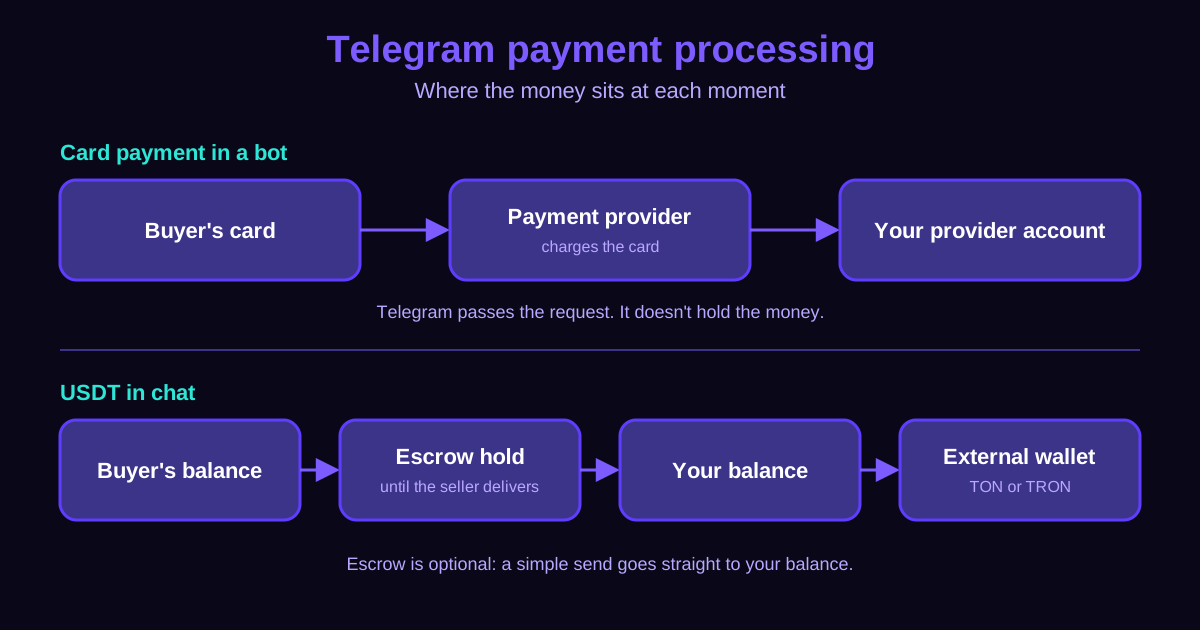
Here's the part most people get wrong. Telegram itself doesn't process card payments. According to Telegram's own Bot Payments documentation, it doesn't process the payment or store payment data. A third-party payment provider handles the card details, and neither Telegram nor you as the bot owner can see them.
So with cards, there are really three players: your bot sends the request, the provider charges the card, and the money lands in your provider account. Telegram just carries the conversation.
USDT works differently. With a USDT wallet inside Telegram, like PAYchat, the money moves between balances instead of through a card network. A buyer can send USDT straight to you, or the payment can sit in escrow first. Escrow just means the money is held in the middle until the seller delivers, then it's released.
If you're still choosing between card payments, Telegram Stars and USDT, I compared those routes side by side in Telegram payment gateway options. This guide stays on what happens during and after the payment.
What happens during a bot checkout?
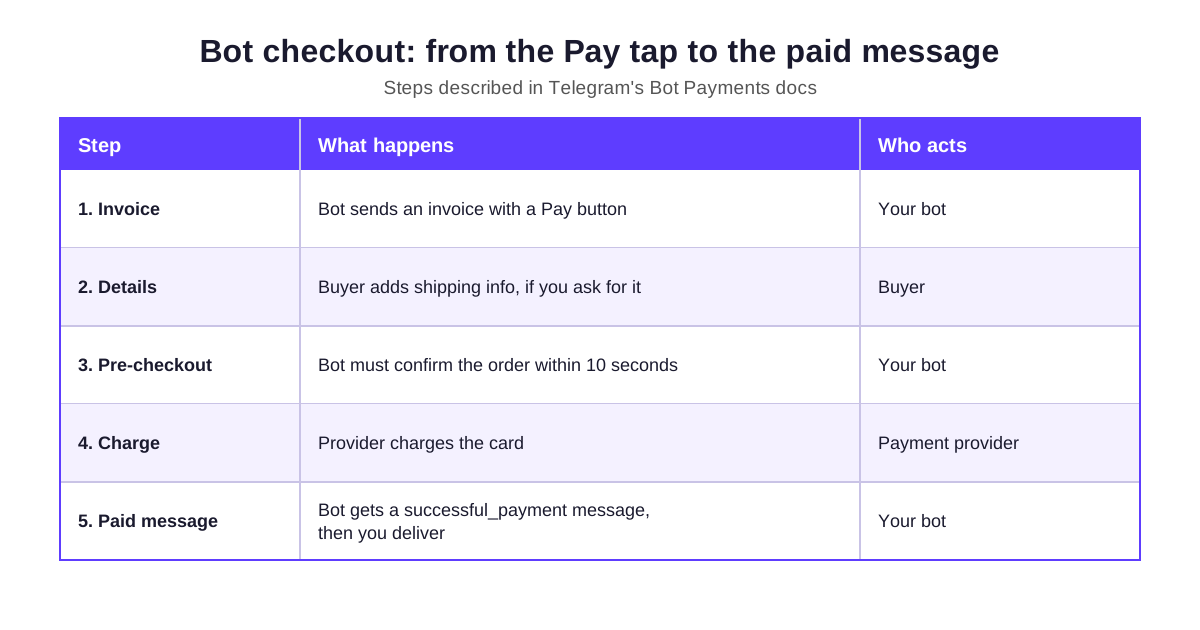
If you take card payments through a bot, the checkout follows a fixed sequence. Your bot has to do its part at two moments, and one of them is on a timer.
| Step | What happens | Who acts |
|---|---|---|
| 1. Invoice | Bot sends an invoice with a Pay button | Your bot |
| 2. Details | Buyer adds shipping info, if you ask for it | Buyer |
| 3. Pre-checkout | Bot must confirm the order within 10 seconds | Your bot |
| 4. Charge | Provider charges the card | Payment provider |
| 5. Paid message | Bot gets a successful_payment message, then you deliver | Your bot |
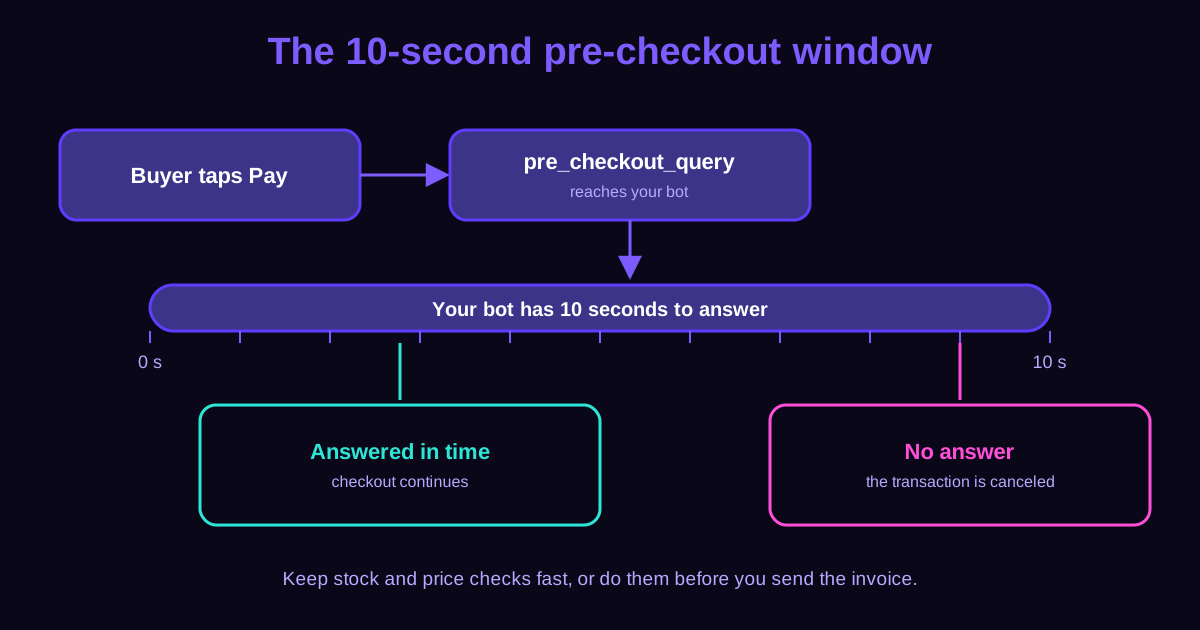
The step people trip over is the pre-checkout. When the buyer confirms, your bot gets a pre_checkout_query and has to answer it. If it doesn't, the payment doesn't go through.
Why does the 10-second pre-checkout rule matter?
Telegram gives your bot 10 seconds to answer that pre-checkout query. Miss it, and the transaction is canceled. Your buyer tapped Pay, and nothing happened.
That usually comes down to your bot doing slow work at the wrong moment. If you check stock, look up a price or call another service right then, the clock is running. The safer habit is to do those checks before you send the invoice, so the pre-checkout answer is instant.
You don't need any of this if you take USDT in chat with PAYchat. There's no invoice flow to code. The buyer just sends the USDT in the chat.
What does processing a payment cost?
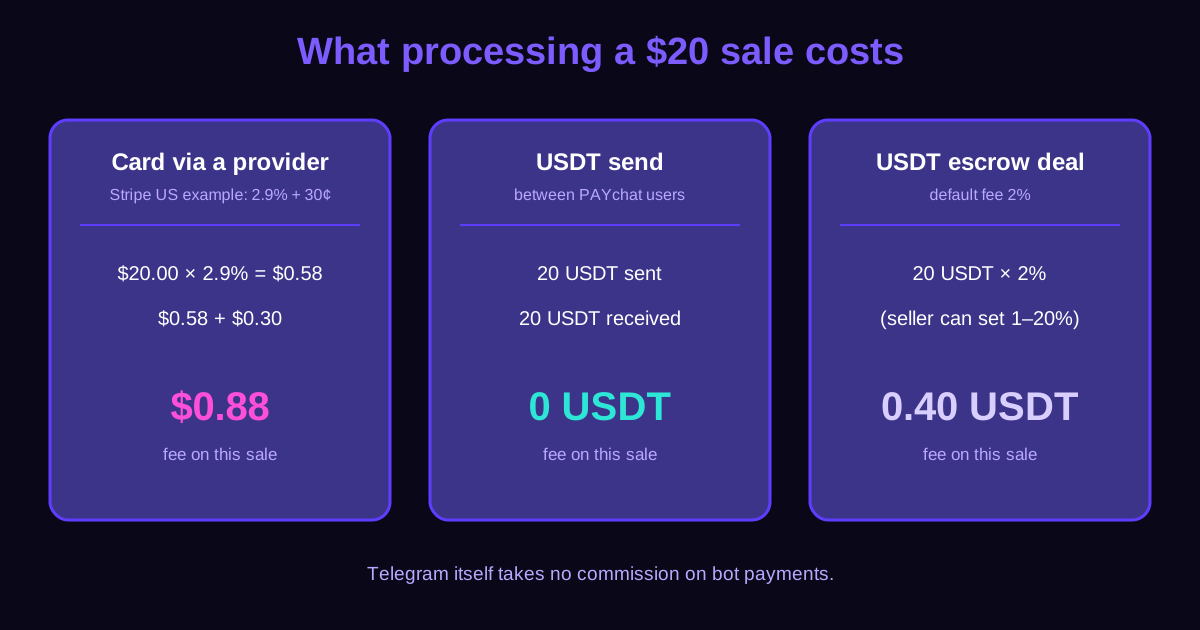
Telegram doesn't take a commission on bot payments. Your cost comes from the payment provider. Telegram's docs use Stripe in the US as an example: 2.9% plus 30 cents per card charge.
Let's run that on a $20 sale. 2.9% of $20 is $0.58, plus $0.30, so you pay $0.88 to process it.
With USDT inside PAYchat, sending USDT to another PAYchat user is free. If you sell through an escrow deal, the default fee is 2%, and you as the seller can set it anywhere from 1% to 20%. On a 20 USDT sale at the default, that's 0.40 USDT.
These aren't the only costs, though. Card providers set their own rates by country, and moving USDT out of Telegram has a network fee, which I'll get to below.
Who handles refunds and disputes?
This is the question to ask before you start, not after. With card payments in a bot, Telegram says it can't handle complaints or chargebacks. A chargeback is when the buyer's bank pulls the money back. That falls on you, your payment provider and the banks involved.
So if you sell by card, you need a plan for handling disputes yourself. Keep order records, delivery proof and a clear refund policy.
Escrow changes the order of things. The buyer's USDT is held until the seller delivers, so the buyer isn't paying on trust, and you know the money is real before you ship. If you want to compare how different escrow services handle this, there's a side-by-side in escrow services compared.
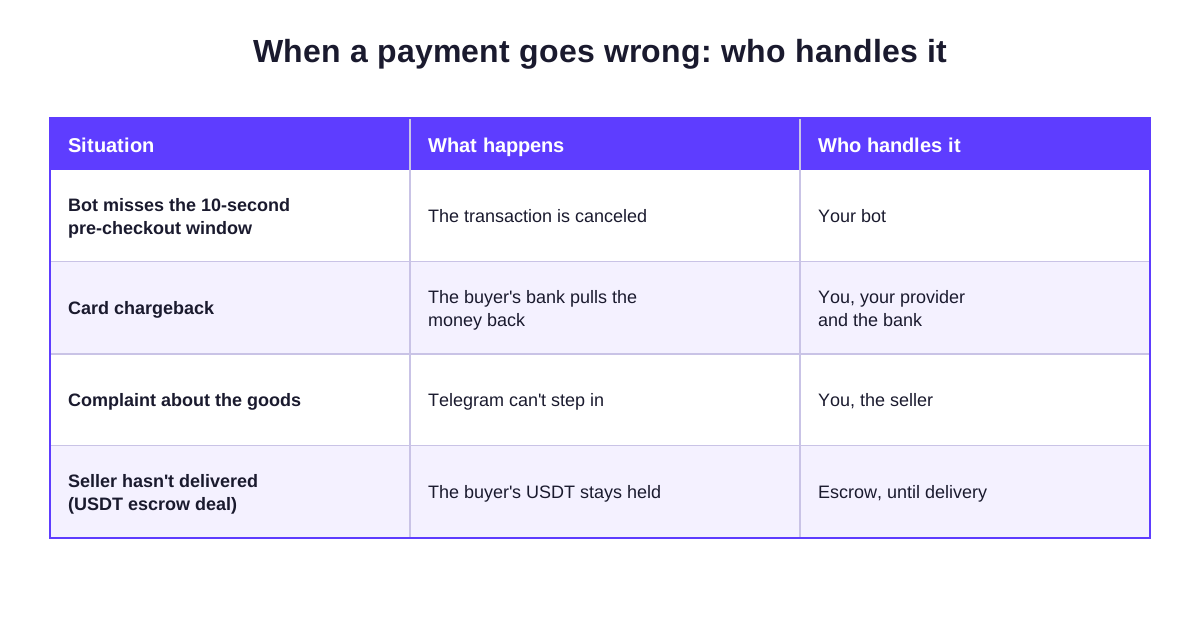
The table I made for this section sums it up: a missed pre-checkout window is your bot's job, a card chargeback is yours along with your provider and the bank, a complaint about the goods is yours as the seller, and an undelivered escrow deal stays held until delivery.
What should you watch out for?
USDT only works if your buyers already use it, or are willing to. If your customers want to pay by card, a bot with a card provider is still the better fit, even with the extra work.
Getting USDT out has its own rules. You can withdraw to an external wallet on TON or TRON, the network fee is shown before you confirm, and the minimum withdrawal is 1 USDT. Deposits come in on more networks than withdrawals go out on, so check which network your wallet uses before you move money.
Escrow protects both sides only if you use it. A plain USDT send between users is free and instant, but it's final. For sales to people you don't know yet, an escrow deal costs a little more and saves you the argument later.
PAYchat numbers in this guide come from PAYchat's own listing data as of Nov 22, 2026. Telegram rules are linked to official Telegram pages.
All guides and comparisons18 guides · 4 comparisons
Telegram channel ads


